

Your website shows traffic. Google Analytics says people are visiting. But the phone isn’t ringing, and the quote form has been quiet for weeks.
That gap between visits and calls is the most common problem we see on plumbing, cleaning, landscaping and other home service websites. The good news: it’s rarely the whole website. It’s usually a few specific leaks, and most of them can be fixed in a week.
Below are the 9 fixes we check first when a service business tells us their site “gets visits but no calls”, in the order we’d fix them.
The short version
First, check that it’s really a website problem
Before changing anything, spend 10 minutes in Google Analytics and Search Console. Answer three questions:
- Are the visitors local? In GA4, open Reports, then User attributes, then Demographic details, and look at City. If most visits come from outside your service area, the problem is the traffic, not the page. Fix 6 covers this.
- What were they searching for? In Search Console, open Performance and read the queries. People looking for DIY tips rarely call. People searching “[your service] near me” do.
- Are people calling from Google instead? Many customers call straight from your Google Business Profile without opening your website. Check the calls figure in your profile’s Performance report before deciding the site is failing.
If the visitors are local, searching for your service and still not calling, the leak is on the website. Here’s what a site that gets calls looks like on a phone:
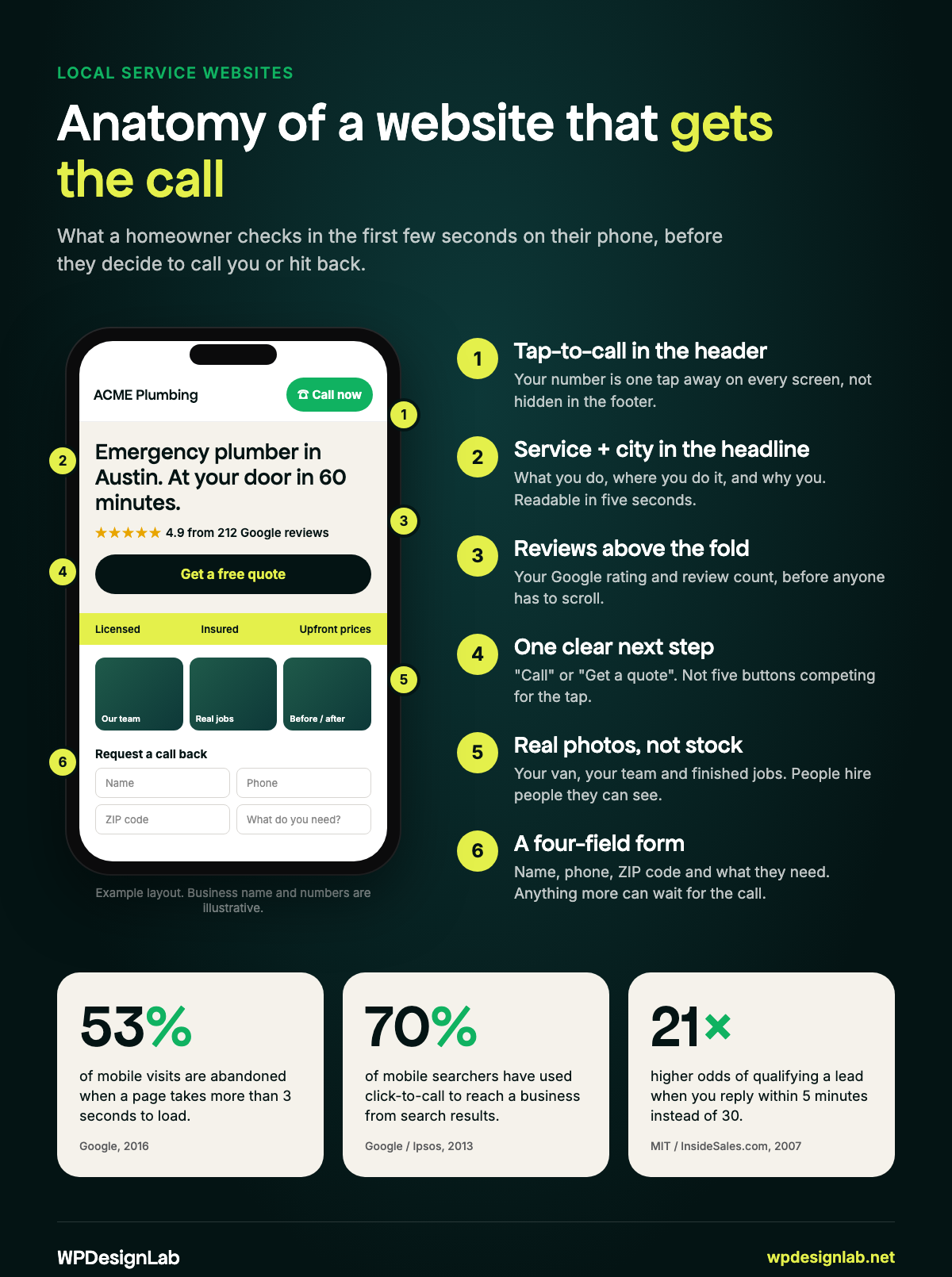
1. Your phone number isn’t one tap away
Most people searching for a plumber, cleaner or electrician are on their phone, and many would rather call than fill in a form. In a Google and Ipsos study, 70% of mobile searchers said they had used click-to-call to reach a business straight from search results.
If your number is an image, sits only in the footer, or isn’t a tap-to-call link, you’re making people work to reach you. Some won’t.
How to fix it
- Put your number in the header as a tap-to-call link (
tel:), not plain text or an image. - Make the header sticky on mobile so the number stays on screen as people scroll.
- Use a clear “Call now” button, not just the number.
- Show your hours or “24/7” next to it, so people know someone will answer.
Quick check: Open your site on your phone. Can you call from every page in one tap, without scrolling?
2. Visitors can’t tell what you do, or where, in five seconds
A homepage that opens with “Welcome to Smith & Sons” or “Quality you can trust” makes visitors guess. They decide in seconds whether they’re in the right place, and guessing is work.
Don’t make me think.
Steve Krug, Don’t Make Me Think
Use a simple headline formula: [Service] in [city or area]. [Your main promise.] Here’s how that changes three typical headlines:
| Before | After |
|---|---|
| Excellence in every pipe | Emergency plumber in Austin. At your door in 60 minutes. |
| Your trusted cleaning partner | House cleaning in Denver. Background-checked cleaners, book online in 60 seconds. |
| Welcome to Green Valley Services | Lawn care and landscaping in Plano, TX. Free quotes within 48 hours. |
Only promise what you actually deliver. A specific promise you keep beats a big one you don’t.
Quick check: Show your homepage to a friend for five seconds, then hide it. Can they tell you what you do and where?
3. The site is slow on phones
Google’s research found that 53% of mobile visits are abandoned when a page takes longer than 3 seconds to load. The study dates from 2016, but someone standing in a flooded kitchen on a weak signal hasn’t become more patient since.
The usual causes on service websites are large uncompressed photos, a slider at the top of the page, too many plugins and cheap shared hosting.
How to fix it
- Test your homepage in PageSpeed Insights and look at the mobile result, not desktop.
- Resize and compress photos, and serve them as WebP.
- Remove sliders and autoplay videos from the top of the page.
- Use page caching and decent hosting. Aim for a Largest Contentful Paint under 2.5 seconds, Google’s “good” threshold.
If you’d rather not do this yourself, our WordPress speed optimization service handles it.
4. There’s no proof you’re good, or even real
Hiring a tradesperson means letting a stranger into your home. Before calling, people look for proof. BrightLocal’s 2025 Local Consumer Review Survey found only around 4% of consumers never read online reviews, and Google is the review site they use most.
How to fix it
- Show your Google star rating and review count near the top of the homepage.
- Add 3 to 6 short reviews with the customer’s first name and town.
- Use real photos of your team, your van and finished jobs. Drop the stock photos.
- Show your licence number, insurance and any guarantee you offer.
- Add badges only for associations and certifications you actually hold.
“People don’t hire a website. They hire the person they can see behind it.”
Not sure which of these is costing you calls?
Send us your website. We’ll record a free video review of it on a phone and show you the 3 changes most likely to bring more calls.
5. One page tries to sell every service
If drain cleaning, water heater repair and repiping are all bullet points on your homepage, someone searching for “water heater repair” lands on a page that barely mentions their problem. Google also has less to rank.
How to fix it
- Give each main service its own page.
- On each page, cover what the job involves, signs you need it, a typical price range, photos of that work, a few FAQs and a call button.
- Link every service page from your menu and your homepage.
6. The wrong people are visiting
Visitors from outside your area, or people looking for DIY tips, will never call. That’s why visits alone are a poor measure of a service website.
How to fix it
- Name your service area clearly on every page: towns, counties or ZIP codes.
- Create service area pages only for places you really serve, and give each one something unique, like jobs you’ve done there. Don’t copy one page and swap the city name.
- Keep your business name, address, phone and service areas the same on your website and your Google Business Profile.
- Check visitor locations in GA4 once a month.
7. The contact form asks too much
Every extra field is another reason to give up. A form that asks for budget, preferred date, full address and “how did you hear about us” before anyone has spoken to you feels like paperwork.
How to fix it
- Ask for four things: name, phone, ZIP code and what they need. Everything else can wait for the call.
- Add an optional photo upload. A photo of the leak or the overgrown yard helps you quote faster.
- Put the form on every service page, not only the contact page.
- Say what happens next, for example “We’ll call you back within 30 minutes during business hours.” Then keep that promise.
8. No prices and no “what happens next”
People put off calling when they fear a hard sell or a surprise bill. You don’t need a full price list. You need enough to set expectations.
How to fix it
- Give “from” prices or typical ranges for your most common jobs.
- Explain any callout or diagnostic fee up front.
- Show a simple three-step process: you call or request a quote, we confirm the price before starting, the job is done and cleaned up.
- Add an FAQ section with the questions customers actually ask you on the phone.
9. Nobody answers fast enough
Sometimes the website works and the leak comes after the enquiry arrives. A study by Dr James Oldroyd at MIT with InsideSales.com found the odds of qualifying a lead were 21 times higher when it was contacted within 5 minutes instead of 30. A homeowner with a burst pipe won’t wait. They call the next company on the list.
How to fix it
- Send form alerts to your phone, not just to an inbox nobody checks during the day.
- Set up a missed-call text-back, so every missed call gets an instant text.
- Send an automatic reply that says when you’ll call back.
- Test it once a month: fill in your own form and time the response.
Measure calls, not just visits
You can’t fix what you don’t count. Set up tracking for phone taps and form submissions as key events in GA4, then check these five numbers each month:
| What to track | Where to find it |
|---|---|
| Visitors from your service area | GA4: User attributes, Demographic details, City |
| Taps on your phone number | GA4 key event for tel: link clicks |
| Quote form submissions | GA4 key event, or your form’s entries |
| Calls from your Google profile | Google Business Profile: Performance |
| Jobs booked | Your job software, or a simple spreadsheet |
If local visits go up and calls stay flat, the website is the leak. If calls go up but booked jobs don’t, look at how enquiries are answered.
Score your website in 2 minutes
Open your site on your phone and answer yes or no:
- I can call in one tap from every page.
- The first screen says what we do and where.
- The homepage loads in under 3 seconds on mobile data.
- Reviews, real photos and our licence are easy to find.
- Each main service has its own page.
- Our service area is named on every page.
- The quote form has five fields or fewer.
- Visitors can see typical prices and what happens after they call.
- New enquiries get a reply within minutes.
8 or 9 yes: your website probably isn’t the problem. Look at your traffic and follow-up.
5 to 7 yes: a few quick fixes should bring more calls.
4 or fewer: your website is likely costing you jobs every week. Start with fixes 1, 2 and 4.
If the list comes back mostly “no”, a website redesign may be quicker than patching. Starting from scratch? See our new WordPress website service.
Frequently asked questions
Free website check
Find out what’s costing you calls
Send us your website. Within 2 business days you’ll get a short video walk-through of your site on a phone, with the 3 changes most likely to bring you more calls. No obligation, and no sales call unless you ask for one.

Reviewed by Nitesh Singh
Founder of WPDesignLab. 150+ WordPress websites built.
Sources
- Google, reported by Marketing Dive (2016): 53% of mobile visits abandoned after 3 seconds.
- Google and Ipsos, click-to-call research (2013): 70% of mobile searchers have used click-to-call.
- BrightLocal, Local Consumer Review Survey 2025.
- Dr James Oldroyd (MIT) and InsideSales.com, Lead Response Management Study (2007).
- Google, Largest Contentful Paint thresholds.